cargo install esp-generate --locked
esp-generate --chip esp32c3 -o unstable-hal -o vscode -o esp-backtrace -o log --headless hello_uferris
| Register | Port 0 | Port 1 | Port 2 | Purpose |
|---|
| Input | 0x00 | 0x01 | 0x02 | Read pin levels |
| Output | 0x04 | 0x05 | 0x06 | Set output pin levels |
| Configuration | 0x0C | 0x0D | 0x0E | Set pin direction: 0 = output, 1 = input (default) |
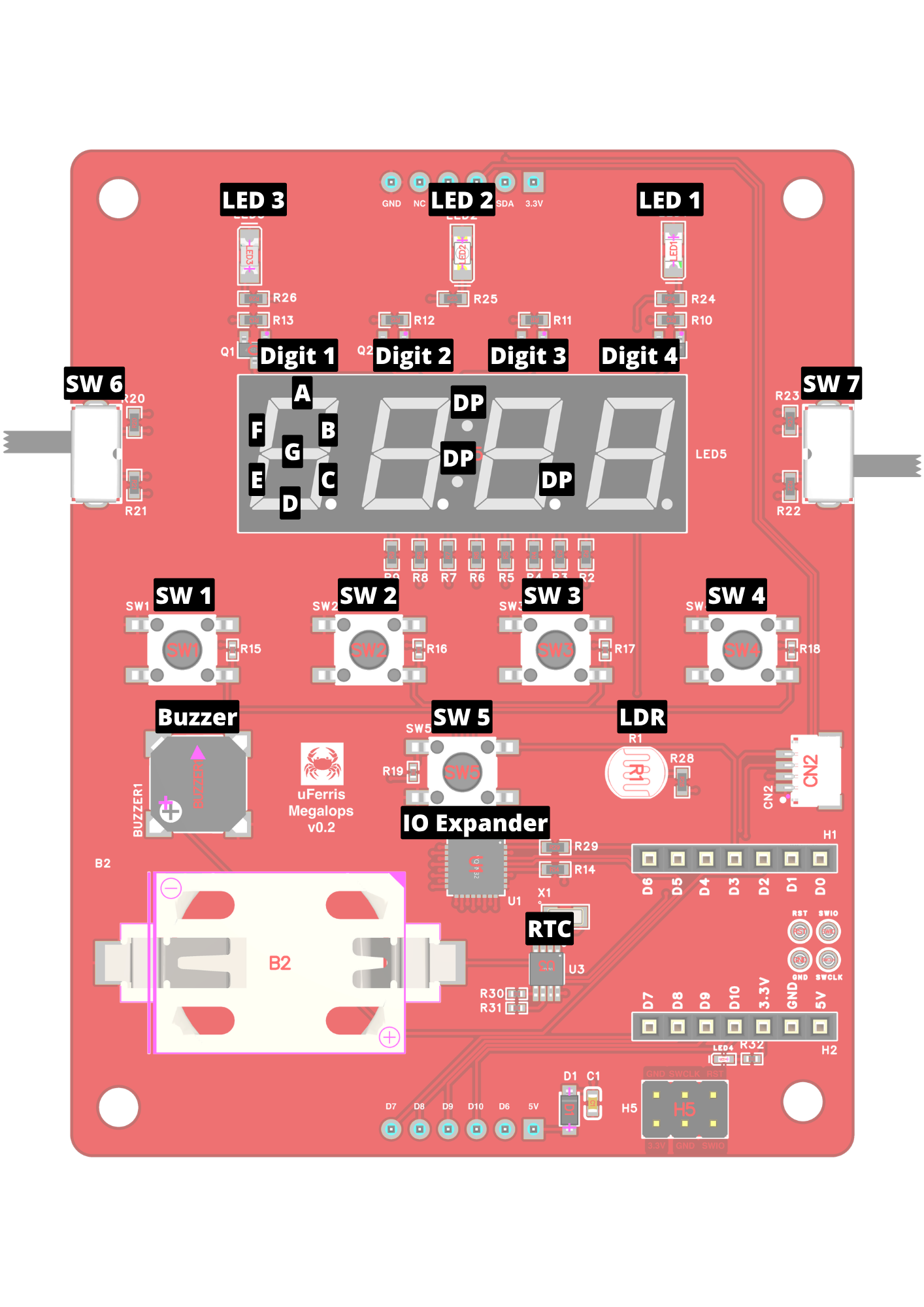
| Enclosure Label | Signal Name | Xiao Pin | I/O Expander Pin | Header H3 | Header H4 | Direction | ESP32-C3 Pin |
|---|
| Alarm | LED 1 | D1/A1 | - | - | - | Output | GPIO3 |
| LED | LED 2 | - | P14 | - | - | Output | - |
| PM | LED 3 | - | P15 | - | - | Output | - |
| - | Buzzer | D2/A2 | - | - | - | Output | GPIO4 |
| Hour | SW1 | - | P07 | - | - | Input | - |
| Minute | SW2 | - | P06 | - | - | Input | - |
| Time | SW3 | - | P05 | - | - | Input | - |
| Alarm | SW4 | - | P04 | - | - | Input | - |
| Snooze | SW5 | D3 | - | - | - | Input | GPIO5 |
| 12 | SW6 Pos 1 | - | P16 | - | - | Input | - |
| 24 | SW6 Pos 2 | - | P17 | - | - | Input | - |
| On | SW7 Pos 1 | - | P00 | - | - | Input | - |
| Off | SW7 Pos 2 | - | P01 | - | - | Input | - |
| - | SDA | D4 | - | - | P2 | Comms | GPIO6 |
| - | SCL | D5 | - | - | P3 | Comms | GPIO7 |
| - | LDR | D0/A0 | - | - | - | Analog | GPIO2 |
| - | Digit 1 | - | P10 | - | - | Output | - |
| - | Digit 2 | - | P11 | - | - | Output | - |
| - | Digit 3 | - | P12 | - | - | Output | - |
| - | Digit 4 | - | P13 | - | - | Output | - |
| - | Seg A | - | P20 | - | - | Output | - |
| - | Seg B | - | P21 | - | - | Output | - |
| - | Seg C | - | P22 | - | - | Output | - |
| - | Seg D | - | P23 | - | - | Output | - |
| - | Seg E | - | P24 | - | - | Output | - |
| - | Seg F | - | P25 | - | - | Output | - |
| - | Seg G | - | P27 | - | - | Output | - |
| - | DP | - | P26 | - | - | Output | - |
| - | XiaoTx | D6 | nINT | P2 | - | - | GPIO21 |
| - | XiaoMosi | D10 | - | P3 | - | - | GPIO10 |
| - | XiaoMiso | D9 | - | P4 | - | - | GPIO9 |
| - | XiaoScl | D8 | - | P5 | - | - | GPIO8 |
| - | XiaoRx | D7 | - | P6 | - | - | GPIO20 |