I2C Foundations
~10 min slides
What is I2C?
I2C (or IIC) stands for Inter-Integrated Circuit. It is a two-wire bus protocol for communicating with sensors, displays, and other devices.
The two wires are:
- SDA — Serial Data (bidirectional). Used to propagate data bits.
- SCL — Serial Clock (driven by the controller). Used to propagate a clock to synchronize data exchanges on the bus.
Since it is a bus, multiple devices can share the same two wires. Each device has a unique address (7-bit) that the controller (master) can use to address any other device (slave) on the same bus.
Theory of Operation
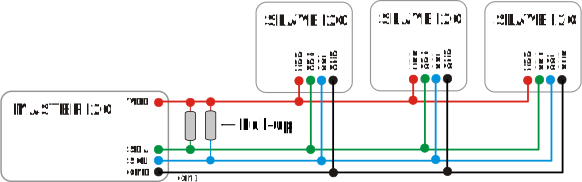
- Each bus has at least one master and one or more slaves that it communicates with. The master is the entity that orchestrates operations on the bus.
- Typically, the microcontroller we are programming would be the master. The master addresses the slaves using the 7-bit address.
- The exchange speed of the data is governed by the clock speed (propagated on the SCL line).
- A master can perform two operations: either read or write.
- I2C exchanges data in one-byte chunks.
Write Operations
A master writes data to a slave. You need to provide:
- The address of the slave
- An array of bytes that need to be written
Read Operations
A master reads data from a slave. You need to provide:
- The address of the slave
- A byte array buffer for the received data
Configurations
| Setting | Description |
|---|---|
| Clock frequency | 100 kHz (standard), 400 kHz (fast), or custom |
| SDA/SCL pins | Any GPIO with I2C capability |